Guide
■ Editing Drills in the App
You can edit any drill in the app. If you change settings such as spin, course, or pitch in-game and save a new code, please update it in the app as well.
■ Reading Drill Menus in-Game
When multiple drills appear on screen, use the following rules. (Excludes top player drills)
・ Menu number has a hyphen「-」
e.g. ✓010-1, ✓010-2, ✓010-3
These are drills in the same group. Check all menus within that group.
・ Menu number has a dot「.」
e.g. ✓010.1, ✓011.2
Each is an independent drill. Check only one menu at a time.
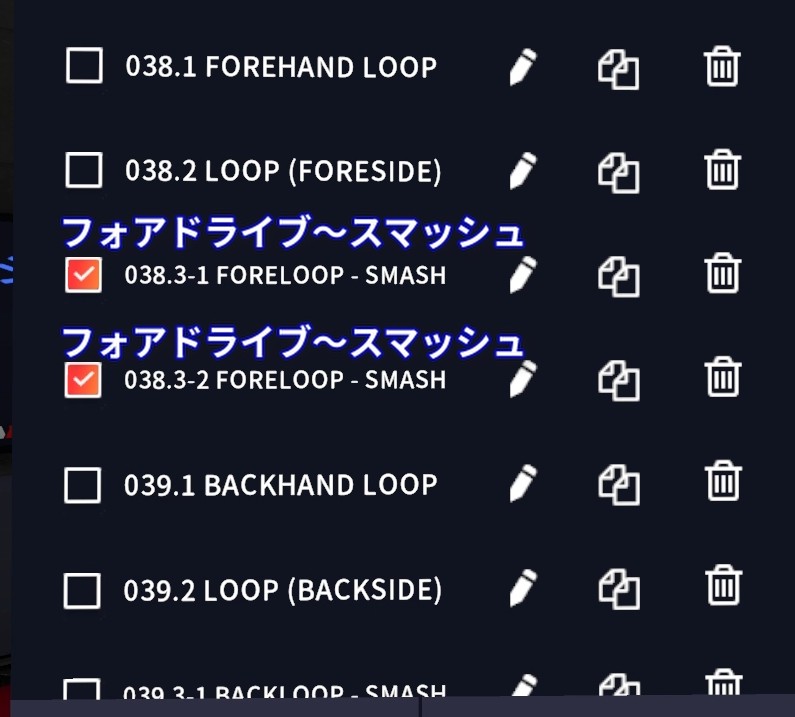
・ Menu number has both a hyphen and a dot
e.g. ✓039.3-1, ✓093.3-2
Prioritize the hyphen rule. Check all menus in the same group.
・ Example
・ Terminology
| FH | Forehand |
| BH | Backhand |
| Loop | Drive (Topspin Loop) |
| Push | Push |
| Step Around | Step Around |
| F | Forehand side |
| M | Middle |
| B | Backhand side |
■ Requesting New Drills
If you'd like a new drill added, please contact us. We'll review and add it as soon as possible.
■ Other
・If any drill info doesn't match the machine code, we'll fix it promptly. ・Some drill descriptions may display incorrectly. If you notice anything, please let us know. Discord: meguri.jp
☕ ETTドリルガイドを応援する
このアプリが「役に立った」「上達につながった」「これからも利用したい」と感じていただけましたら、コーヒー1杯分のご支援をいただけると大変励みになります。
いただいたご支援は、機能改善や新しいツール開発に活用させていただきます。
☕ Buy me a coffee
